
ChatGPT Character Sheet Prompt: Build a Story Bible
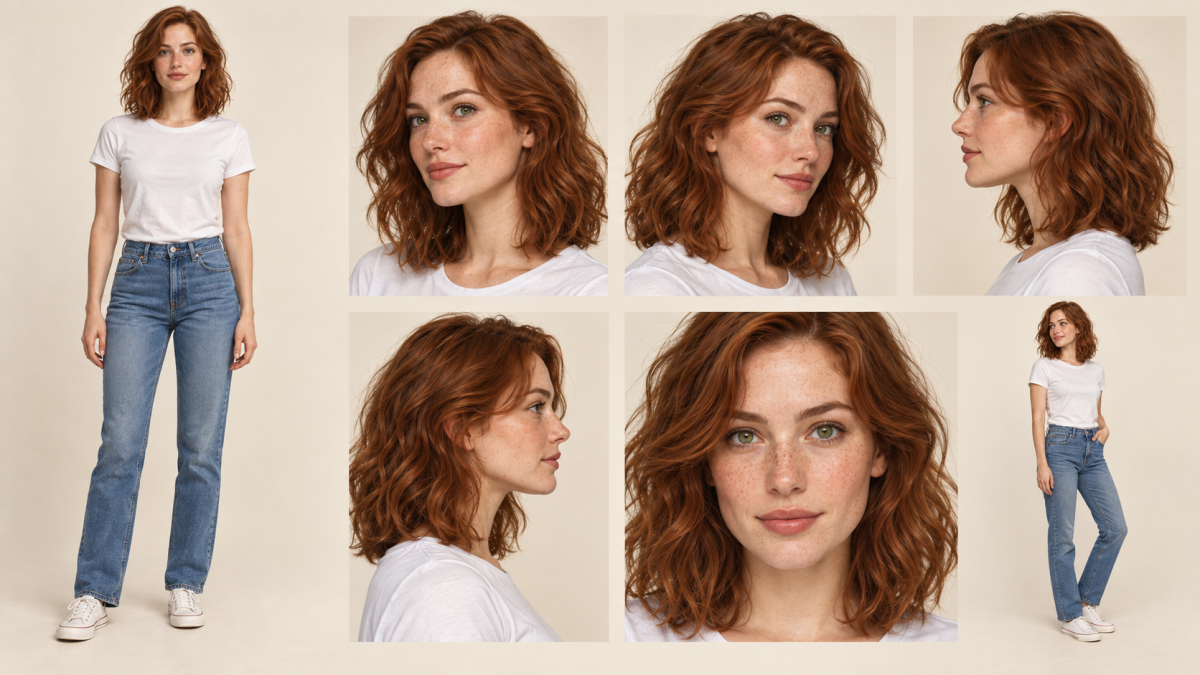
A character can sound convincing in one scene and contradict an earlier chapter in the next. Images introduce a second problem: the outfit looks right, but the face or hair has changed. A reusable ChatGPT character sheet prompt gives you a reference for checking both narrative continuity and visual identity.
Build two connected records: a text sheet describing the character's story, and an approved visual reference showing their appearance. Attach or paste the relevant material when you start a new task. Then inspect the result before adding it to your project. References help you direct the work; they don't guarantee perfect consistency.
Key Takeaways
Keep character identity separate from the current scene brief.
Record what the character knows, wants, and believes at this point in the story.
Start with an approved visual reference and add only the views you need.
Check writing and images separately, then repair a specific discrepancy.
Version permanent changes so an older reference doesn't undo character development.
Separate character identity from the scene brief
The character sheet holds the facts you want to carry between requests. The scene brief describes the immediate task. Keeping them separate makes it easier to spot an accidental change and decide whether it belongs in the story.
Character sheet | Scene brief |
|---|---|
Appearance and distinguishing features | Pose, framing, location, and lighting |
Established voice and relationships | Who is present and what happens now |
Current goals, knowledge, and boundaries | Immediate obstacle or emotional state |
Reference outfit and approved changes | Temporary clothing override |
Story point and version | Output format and length |
For example, “auburn hair and freckles” belongs in the visual identity. “Wearing a raincoat in a railway waiting room” belongs in the scene brief. A permanent haircut needs an approved sheet update; a raincoat for one scene doesn't.
A convincing first result isn't evidence that later outputs will stay consistent. Make the sheet useful enough that you can compare a new result with it, rather than relying on the assistant to infer the entire character from the current scene.
Record appearance and story continuity
Six visual fields provide a practical starting point: age or age range, hair, skin and distinguishing marks, eyes, build, and a reference outfit. Use descriptions you can inspect in an image. Record an age that fits the story, but don't treat an exact number as a technical identity lock.
For a story bible, add the information that governs decisions:
Voice: sentence rhythm, vocabulary, and how speech changes under pressure.
Current goal: what the character is trying to accomplish.
Relationships: trust, conflict, and information withheld from other people.
Knowledge: what they have learned by the current chapter, and what they haven't.
Boundary: a present commitment or limit, with room for deliberate development.
Story point: the chapter or timeline position this sheet describes.
A boundary can change. If a cautious character makes an accusation without evidence, record the reason and consequences instead of letting a prompt silently redefine them.
A reusable ChatGPT character sheet prompt
Fill this template once, then revise it when the story changes. Keep the text sheet alongside your approved images so you can supply both in a new conversation.
CHARACTER SHEET
Name:
Version and story point:

Visual identity:
- Age or age range:
- Hair color, texture, and length:
- Skin tone and distinguishing marks:
- Eye color and shape:
- Build:
- Reference outfit:

Story continuity:
- Voice:
- Current goal:
- Relationships:
- What the character knows:
- What the character does not know yet:
- Current boundary:
- Approved permanent changes:

SCENE BRIEF
Setting:
People present:
Immediate goal or obstacle:
Emotional state:
Temporary outfit override:
Requested output:

Use the character sheet as the continuity reference.
Apply the scene brief without silently changing established facts.
Flag an apparent contradiction or missing detail before resolving it.
For an image request, attach the approved reference and specify the change: “Use the attached character reference. Keep the face, hair, distinguishing marks and proportions. Show a three-quarter view in the reference outfit against a plain studio background.” Inspect the image afterward; the instruction is a request, not a guarantee.
A filled-in example: Emma Vale
Emma is a fictional example created to demonstrate the template, not a report of a tested character-generation system.
Field | Example entry |
|---|---|
Appearance | 27; shoulder-length wavy auburn hair; fair skin with freckles; green eyes; slim build |
Reference outfit | White T-shirt and blue jeans |
Voice | Direct; shorter sentences under pressure; asks a clarifying question before agreeing to an uncertain plan |
Current goal | Recover a missing notebook before a deadline |
Relationship | Trusts her sister's judgment but hasn't told her about the notebook |
Knowledge | Knows where the notebook was last seen; doesn't know who took it |
Current boundary | Avoids accusing someone without evidence |
Story point | Chapter two, before the notebook is recovered |
Her scene brief might be: “A railway waiting room at dusk. Emma is tired and trying to stay composed. A raincoat covers her reference outfit. No other characters are visible.”
For writing, an immediate check is whether she names the thief before learning who took the notebook. For images, the raincoat is an approved scene change; different eyes or an unrequested haircut need review.
Build a reference set: hero first, then useful angles
Begin with a full-body front view if you need body proportions and clothing references. For a portrait-only project, a clear face reference may be the more useful first image. Approve that starting image before using it to guide further views.
Save the approved reference locally. When requesting another angle, attach it again if necessary and describe the specific change. Add another approved view when it supplies useful information, such as a profile. Don't keep passing forward a result you have already rejected.
Ten views are an optional coverage plan, not a requirement for every character. This list gives you filenames and a purpose for each:
File | View | What to inspect |
|---|---|---|
| Full-body front | Overall proportions and reference outfit |
| Three-quarter left | Face shape from an oblique angle |
| Three-quarter right | Features on the other side |
| Left profile | Nose, forehead, chin, and hair outline |
| Right profile | Opposite profile and visible marks |
| Face close-up | Eyes, freckles, and facial details |
| Over the shoulder | Hair and head orientation |
| Waist-up portrait | Face and upper-body proportions |
| Full-body three-quarter | Posture and clothing from another angle |
| Slightly elevated view | Perspective changes in the face |
Generate only the views that serve your project. Work through them individually so you can review each result before it becomes a reference. Browser features, attachment allowances, and usage limits can vary; API reference-image limits aren't a specification for the chat interface.
Google's image-generation documentation describes using earlier images as references for subsequent character angles. It supports the general iterative approach, without establishing browser-specific capacities. See the official reference-image examples.
QA and drift repair
Check writing and images separately. A visually consistent portrait can accompany a scene that reveals information the character hasn't learned. A coherent scene can still have an illustration with unapproved appearance changes.
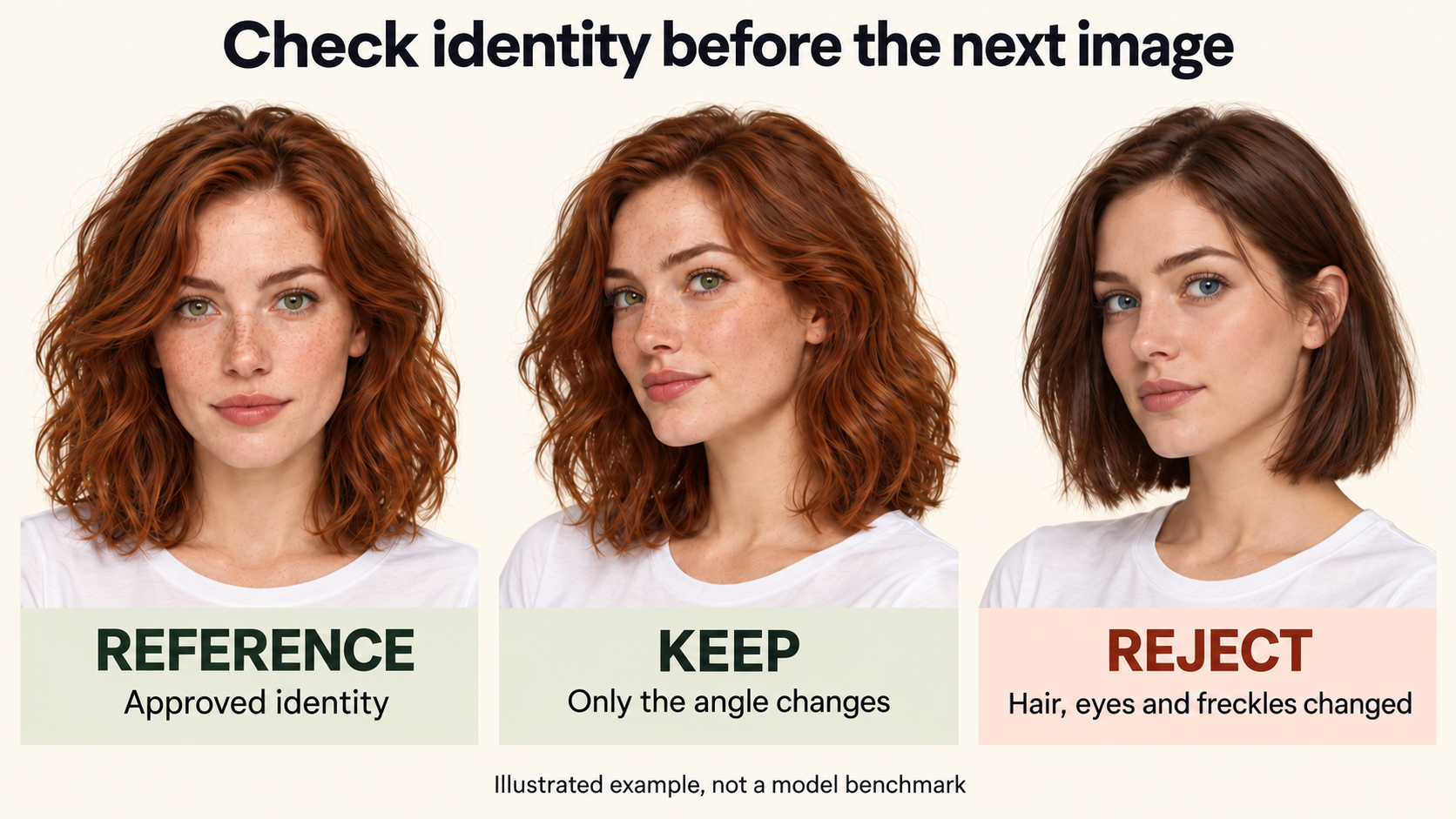
Illustrated example: a different pose is acceptable; unapproved changes to hair, eye color or facial features need review. This is not a model benchmark.
Check narrative continuity
Compare the scene with the sheet's story point. What does the character know? What are they trying to achieve? Has a relationship changed in an earlier chapter? Does the dialogue fit the described voice in this situation?
Use a review request such as:
Compare this scene with the attached character sheet.
List possible contradictions involving knowledge, motivation,
relationships, voice, and timeline.
For each concern, quote the relevant scene passage and sheet entry.
Do not rewrite the scene yet. Mark uncertain cases for my review.
This gives you specific passages to inspect before approving a change. Keep intentional surprises when the story supports them.
Check visual identity
Compare face shape, hair, eye color, distinguishing marks, body proportions, and clothing against the approved reference. Account for lighting and perspective: darker lighting alone doesn't establish that the hair color changed.
Open the image at a useful size and inspect the features that matter to your character. If several things changed, list them explicitly. “Make it more consistent” leaves the repair target unclear.
Official OpenAI documentation notes that recurring characters can still lose visual consistency across generations. Treat the sheet and reference set as review tools rather than an identity guarantee.
Repair a specific discrepancy
Attach the approved reference and the image to repair. Identify their roles so the desired pose doesn't accidentally become the identity source.
Image 1 is the approved identity reference.
Image 2 is the image to repair.

Keep Image 2's three-quarter pose, white T-shirt, framing, and background.
Restore shoulder-length wavy auburn hair and green eyes to match Image 1.
Preserve Image 1's face shape and freckles.
Do not add accessories or redesign the character.
Inspect the result before adding it to the approved set. If it still changes important features, try a narrower edit or choose a clearer reference. More description isn't automatically better; use enough detail to specify the discrepancy without introducing unrelated changes.
Version the sheet as the story develops
When a change becomes permanent, update the text sheet and visual reference deliberately. Keep the earlier version for scenes set before that change.
Version | Story point | Approved change | Reference action |
|---|---|---|---|
v1 | Before the midpoint | Original appearance and current knowledge | Keep the initial approved set |
v2 | After a planned haircut | Shorter hair; other identity features retained | Approve a new anchor and affected views |
v3 | After the notebook is recovered | Knowledge and immediate goal change | Update text; retain images if appearance is unchanged |
These are example entries, not events you must include in your story. A knowledge update doesn't require regenerating every portrait. An appearance change needs references appropriate to that story period.
Keep approved images, the current sheet, and a short change log together. When starting a new conversation, supply the version needed for the scene rather than assuming the assistant has the correct history.
Start with one character and one scene
Complete the sheet, approve the initial reference, and test a scene that makes the character use their knowledge or act under pressure. Review the writing and image separately. Add more reference angles once you know which views the project needs.
The useful result is a small set of materials you can check and update: who the character is, what has changed, and which version belongs in the next scene.
