Claude Code vs After Effects: The 2026 Decision Guide

Search for a straight comparison and you'll find a dozen posts that all answer the same question the same way: "here's how to do motion graphics without After Effects." They're useful, and they all skip the thing you actually need to know.
Claude Code and After Effects are not competing products. One is an agent that writes code; the other is a keyframe editor. Comparing them head-to-head is a bit like asking whether a compiler beats a paintbrush — the honest answer depends entirely on which task you're doing, and the split is surprisingly stable once you lay it out.
This guide gives you that split. You'll get a task-by-task comparison, the render-time catch that most write-ups leave out, the real cost math, and a way to decide by role rather than by hype.
Claude Code vs After Effects: The Honest Answer
Here's the reframe that makes the whole decision easier. Claude Code can invoke rendering tools; it is not itself the rendering engine. It writes code — usually React or HTML — and a rendering engine like Remotion or Hyperframes turns that code into frames and then into an MP4.
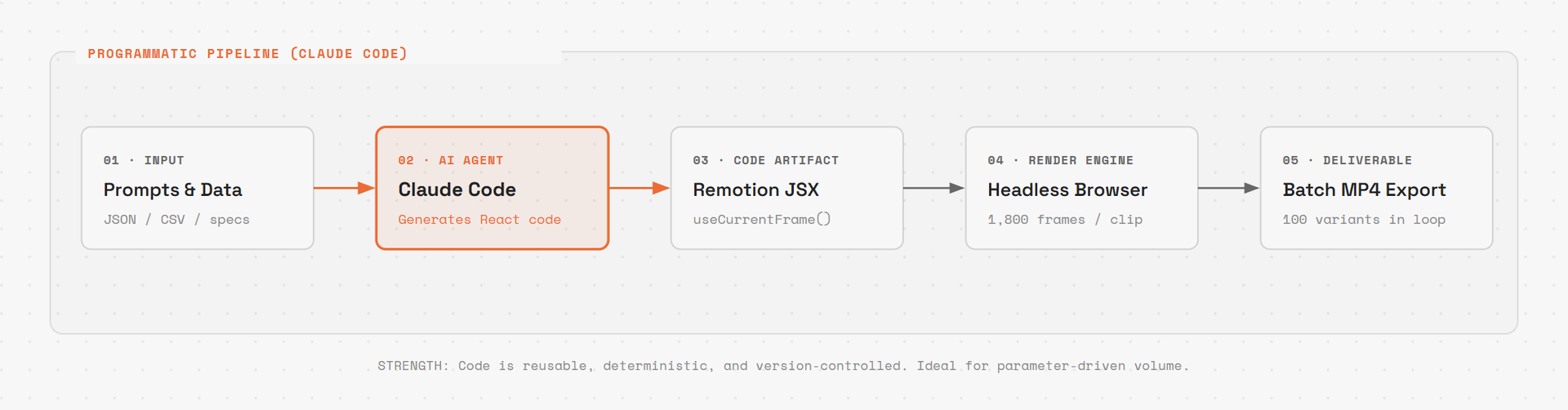
The Code-First Pipeline: Claude Code writes parameterised React components, and headless Chromium renders frames for batch export.
After Effects, by contrast, is the renderer, the editor, and the timeline. You drag keyframes, you preview, you export.
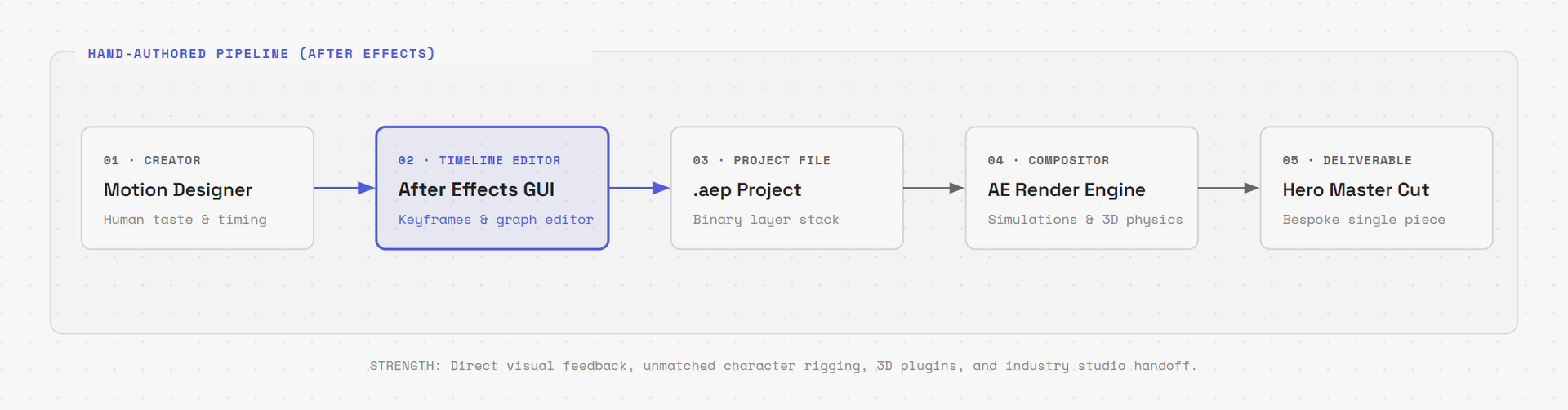
The Timeline Pipeline: An integrated environment where the designer controls keyframes, curves, simulations, and rendering in a single GUI.
So the real comparison is not "Claude Code or After Effects." It's "programmatic video or hand-authored video" — and Claude Code is one way to author programmatic video;measure the full workflow on your own project. Framed that way, the decision becomes concrete: it's about whether your particular asset is better described in code or drawn by hand.
The workflow can also use existing footage: Remotion’s Video component supports embedding, trimming, and arranging video. A dedicated editor may be more convenient for manual cutting, but footage editing is not excluded by the code-first approach.
Once you accept that framing, the task-level split stops being a matter of taste and starts looking almost mechanical.
The Task-by-Task Split: Suggested Fits
Task | After Effects | Claude Code + Remotion | Suggested starting point |
|---|---|---|---|
Data visualisation (charts, counters) | Keyframes or data-driven expressions | Data drives the component | Claude Code |
Kinetic typography | Text animators, expressions, or keyframes | Staggered springs in code | Claude Code |
Lower thirds, title cards | Template + manual edit | Parameterised component | Claude Code |
Batch output (100 variants) | Templates, data, expressions, and scripts | A loop | Claude Code |
Loading states, icon reveals | Straightforward | Straightforward | Tie |
Any number of revisions | Edit linked controls, expressions, or keyframes | Change a value, re-render | Claude Code |
Character animation | Puppet tools and plugin workflows | Custom code; review motion quality | After Effects |
3D scenes, particles, physics | Native 3D and plugin options; test the shot | 3D integrations and custom code; test the shot | After Effects |
Broadcast-grade compositing | Integrated compositing tools | Evaluate compositing features and integration effort for the shot | After Effects |
Cutting raw footage | Supports footage operations; a dedicated editor may suit manual cutting | Supports footage operations; a dedicated editor may suit manual cutting | Neither |
Read the middle column carefully and a pattern emerges: I would try the code-first workflow for repetitive, parameterised, or data-driven work, and compare After Effects for bespoke motion and compositing. That's not a knock on either tool. It's just what happens when you describe an asset in code instead of drawing it frame by frame.
So if the table settles what to use, the next question is what it actually feels like when Claude Code is doing the work.
Where Claude Code Wins
The wins cluster around one property: code supports reusable logic; After Effects also provides templates, expressions, and data-driven animation.
Say a client asks for a comparison animation across twelve products. In After Effects that's twelve sequences, or a spreadsheet-driven expression setup that takes real effort to get right. In Remotion it's a React component and a .map() over your data array. Change the data, the animation changes.
Three specific advantages show up again and again:
A single source of truth for design. Ask the agent to extract colours, fonts, and timing into one theme file, then have every component read from it. Rebrand the whole package by editing one object. In After Effects, linked controls and expressions can also centralize changes. Adobe documents data-driven animation using imported data rather than requiring manual edits for every value.
Version control that behaves like software. The usual After Effects
.aepfile is binary, which makes line-by-line diffs difficult. It can still be versioned and branched, and Adobe also supports XML project copies; review workflows differ from source-code review. A Remotion project is code. You can see exactly what changed between revisions, and so can a teammate.Deterministic, repeatable output. Drive animation from the frame number and keep inputs stable for reproducible renders; wall-clock time, random values, or changing external data can break determinism. That matters enormously if you're generating assets on a schedule or across a hundred variants.
💡 Tip: Frame determinism is the concept worth internalising before anything else. Remotion animations are driven by
useCurrentFrame()and helpers likeinterpolate()andspring(). If you understand that a frame cannot depend on wall-clock time, most "why does my animation look wrong" problems answer themselves.
If you want the gentlest on-ramp, animation that lives in an SVG you can animate with Claude Code is the least intimidating first project — no rendering pipeline required, and you can see results immediately.
That's the upside. The honest counterweight is that this approach has real ceilings, and hitting one of them mid-project is a bad time to discover it.
Where After Effects Still Wins
I would evaluate After Effects or specialist tools first for the following work.
Character animation. After Effects offers Puppet tools and a plugin ecosystem for rigging and motion work. Compare those controls with the code and review effort your particular character shot would need; this guide does not prove that a code-first workflow cannot produce natural results.
Complex 3D and simulation. After Effects has 3D and plugin workflows, and Remotion integrates React Three Fiber. Check the required simulation, compositing, hardware, and editing controls on a representative shot before selecting a pipeline.
There's also a category of work that quietly resists automation for a different reason: judgement. Which cut lands, how long a beat should hold, whether the pacing feels premium or cheap — that's taste, so keep an accountable reviewer for the intended timing and style.
⚠️ Warning: Don't judge this tool choice on a demo. A polished 15-second hero animation generated in one prompt tells you the ceiling is high; it doesn't tell you what happens at revision nine, when the client wants the pacing changed and one label corrected. Test the workflow on a real, annoying, multi-revision job before you commit a project to it.
Knowing where the ceiling sits is useful, but there's a more mundane surprise waiting for people who adopt the code-first path — and it's the one that most often gets discovered at the worst possible moment.
The Render-Time Gotcha Nobody Warns You About
Here's the experience that catches people out. You're iterating in the preview, and every change appears instantly. It feels like a video editor.
Then you render, and it's slow. Much slower than the preview implied.
This isn't a bug — it's the architecture. The preview server renders only the frames you're looking at. A real render evaluates every frame at full resolution. A 60-second clip at 30fps is 1,800 full frames, each one a React render followed by a screenshot and an encode.
There's a second trap layered on top: GPU access depends on the browser mode, operating system, drivers, and render environment. So GPU-heavy work — WebGL, canvas, blurs, shadows, gradients — can get dramatically slower during a render than it looks in the preview, and cloud machines without a GPU are the worst case.
The good news is that Remotion documents the levers, and the time needed to tune them depends on your project:
# Fast iteration render — half resolution, lower JPEG quality
# Use this while you're still changing things; never for delivery
npx remotion render MyComp out/draft.mp4 --scale=0.5 --jpeg-quality=50

# Find the best frame concurrency for this specific machine
# Both too high and too low make renders slower, so measure rather than guess
npx remotion benchmark src/index.ts MyComp --concurrencies=1,2,4

# Full-quality output for delivery
npx remotion render MyComp out/final.mp4 --scale=1 --jpeg-quality=90
A few more settings worth knowing, all documented in Remotion's performance guide and render CLI reference:
Prefer JPEG over PNG frames. PNG may render more slowly, but can be useful for transparency or lossless/color-accuracy requirements.
Avoid the VP8 and VP9 codecs for WebM. They compress harder and encode very slowly. H.264 is the sensible default via
--codec=h264.Use
<Video>from@remotion/media, which Remotion currently recommends for video rendering performance. Its performance guide recommends migrating from<Html5Video>and<OffthreadVideo>. Measure your own bottleneck rather than assuming frame extraction is always dominant.For GPU effects, review the documented
--glrenderer and--chrome-modeoptions alongside the machine’s drivers. A flag does not provide hardware that the environment lacks.
🚀 Pro tip: Set your
--concurrencyby measurement, not by instinct. The intuitive move is to crank it to the number of CPU cores; the documented behaviour is that both too high and too low hurt, andnpx remotion benchmarkexists precisely because the right value is machine-specific.
Budget for render time the way you'd budget for anything else in a pipeline — it's predictable once you've measured it, and it's the difference between a workflow that feels magical and one that feels like waiting.
The Real Cost Math
Cost comparisons in this space are usually sloppy, so here are the verified numbers.
After Effects is US$22.99/month on the annual plan billed monthly — roughly $276 per year. It's also included in Creative Cloud Pro; Adobe's listed price depends on the plan and current promotion.
The Claude Code stack is Remotion plus your existing Claude subscription or API usage. Remotion is source-available, though its licence does require a company licence in some cases — worth checking Remotion's licence terms against your organisation's size before you standardise on it.
So the software line item is not where the interesting difference lives. Two other costs matter far more:
Render and compute time. Server-side rendering is cheap per minute but not free, and it scales with how many variants you ship. If you're generating a hundred personalised clips a week, include compute and render time for either workflow, including local hardware or render infrastructure used by After Effects.
Token consumption. Agent-driven projects burn context — large frame data, repeated renders, and iterative prompts add up. It's not prohibitive, but it's not zero either, and it's the cost that most often surprises people who assumed the switch was free.
Compare subscriptions and licence eligibility, agent usage, template development, revisions, and render compute for both options. Volume alone does not establish which is cheaper; use a representative job and your actual rates.
That's the tooling argument. But for many people reading this, the question underneath is a career one, and it deserves a direct answer.
What This Means for Your Career
If you are considering After Effects for motion work, check the tools and delivery formats required by the clients or roles you want. Learning both timeline and code-first workflows is a reasonable option.
Check the job listings and delivery requirements relevant to your work. A team using After Effects may require an .aep project; a code-first team may require source files and render instructions. Agree on the handoff format before choosing the pipeline.
A useful career goal is to combine production skills with direction and output review. Treat that as career advice to assess against your own work.
The practical version: learn After Effects as your craft foundation, and learn the code-first workflow as leverage. Designers who can do both — who can brief an agent precisely and recognise when the output is subtly wrong — are unusually well positioned right now.
None of which tells you what to do on Monday morning with a specific brief in front of you. So let's make it concrete.
How to Choose, by Role
If you're a designer without coding experience: stay in After Effects for client delivery, and use Claude Code for the repetitive assets that drain your week — social cutdowns, lower thirds, batch variants. Treat it as an assistant, not a replacement. Start with the SVG route if you want a low-stakes first win, and check what happens when Claude Code's animation output doesn't work as expected — knowing the failure modes in advance saves an afternoon.
If you're a developer who needs motion assets: you likely don't need After Effects at all for routine work. Learn Remotion's frame model, install its agent skills, and measure your render times early. The learning curve is mostly React knowledge you already have.
If you're a hybrid — designer who codes: this is the strongest position in 2026. Build a shared design-system file, keep your assets in version control, and use agents for volume while you own direction and the final polish pass.
If you're hiring: the useful signal is no longer "knows After Effects" but "can judge motion output and direct its production." Those are different skills, and only one of them is being automated.
Whatever path fits, the underlying principle is the same one that's always applied to tools: pick the one that makes your specific work cheaper to revise. Everything else is fashion.
The "Claude Code vs After Effects" framing will keep circulating because it's a good headline. The practitioners getting real work out the door have quietly stopped asking which one wins and started asking which tasks belong to which — and then getting on with the cut.