How to Build MCP Gateway from Scratch
This guide covers how to build MCP gateway from scratch - a production middleware layer that routes, authenticates, rate-limits, and observably forwards AI agent tool calls. Covers TypeScript code, architecture decisions, and hardening for multi-tenant deployments.
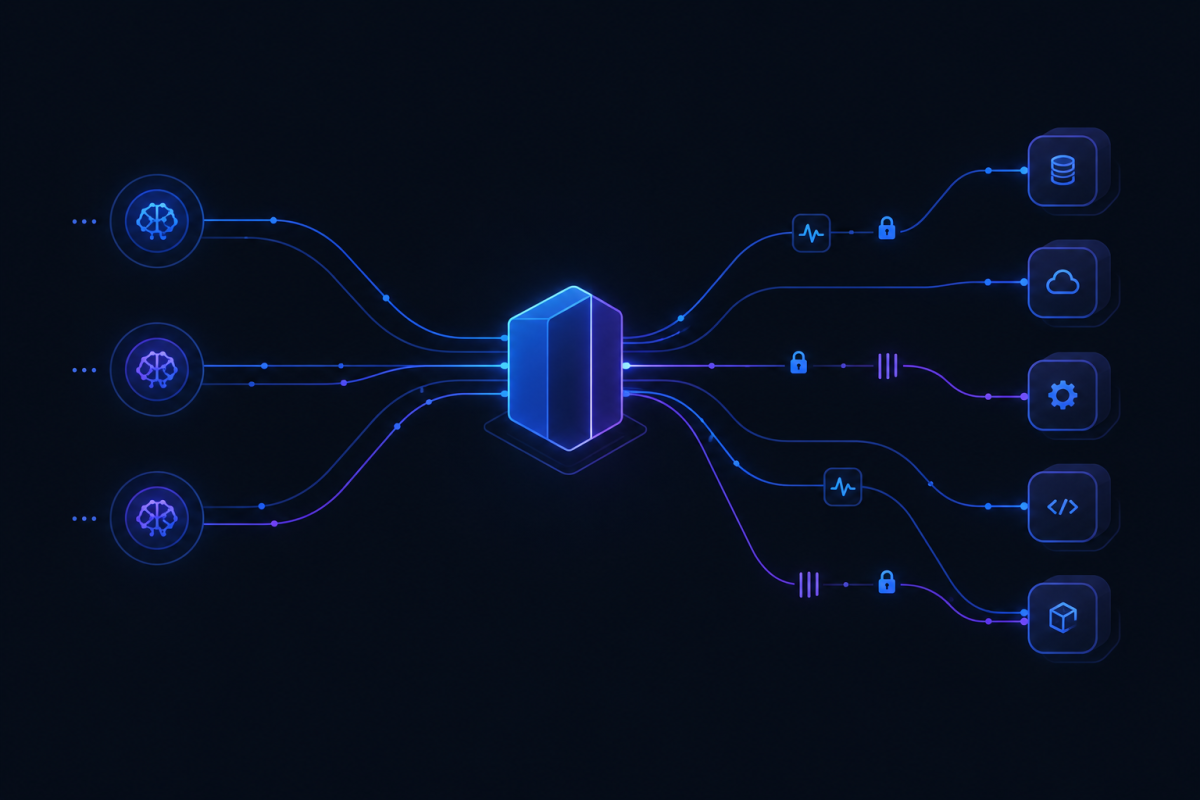
An MCP gateway is a middleware layer that sits between AI agents and the external tools, data sources, and services they need. It handles routing, authentication, rate limiting, protocol translation, and observability so agents can call tools without managing connections, credentials, and retries themselves.
You would build one instead of stitching together ad-hoc clients because production AI systems need consistency, security, and debugging visibility that raw MCP client libraries do not provide. Off-the-shelf MCP server setups assume a single agent, a single tool, a single environment. Real deployments have multiple agents, dozens of tools, per-tenant access rules, and audit requirements. A gateway centralizes all of that.
This post walks through the architecture, implementation patterns, and production hardening for building an MCP gateway from scratch. For background on Model Context Protocol fundamentals, see Anthropic's MCP documentation.
TL;DR: Build an MCP gateway to centralize routing, auth, rate limiting, and observability for AI agent tool calls. Start with TypeScript + MCP SDK, add a routing engine backed by a config store, implement JWT auth with JWKS caching, use Redis for rate limiting, add circuit breakers for resilience, and log everything for debugging.
What Is an MCP Gateway?
The Model Context Protocol lets AI agents talk to external tools over a standardized transport. An MCP server exposes tools; an MCP client connects and calls them. An MCP gateway sits above both, intercepting and managing every request.
Think of it as the API gateway pattern applied to the MCP layer. Just as Kong or Envoy sit between your services and the internet, an MCP gateway sits between your agents and your MCP servers. It does not replace either - it sits in the middle and adds:
Routing: which agent reaches which server, which tool
Authentication: verifying the caller and the target
Rate limiting: preventing one noisy agent from starving others
Protocol translation: normalizing differences between MCP versions or transports
Logging and metrics: capturing every tool call for audit and debugging
Without a gateway, each agent carries its own connection logic, auth tokens, and retry code. When a tool changes auth requirements or throttles, you update every agent. With a gateway, you update one layer.
If you are routing AI model requests across multiple providers, see How to Route AI Requests to the Cheapest Model for the routing patterns that translate directly to MCP tool routing.
Core Architecture Components
A production MCP gateway has five essential pieces. Each one can be swapped or scaled independently.
Transport Layer
The transport layer accepts incoming MCP connections from agents and outbound connections to MCP servers. Most implementations use stdio or SSE transport per the MCP specification. The gateway needs to handle both simultaneously, managing connection pools for outbound calls.
interface TransportConfig {
  inbound: 'stdio' | 'sse' | 'streamable-http';
  outbound: 'stdio' | 'sse';
  maxConnections: number;
  idleTimeoutMs: number;
}
Connection pooling is critical here. Each agent-to-gateway and gateway-to-server connection consumes a file descriptor. Without maxConnections, you hit OS limits under production load. The MCP SDK's StreamableHttpTransport and StdioTransport handle the wire protocol, but you configure the pool boundaries. Per Anthropic's MCP SDK documentation, connection limits depend on your Node.js process ulimit settings.
Routing Engine
The routing engine maps an incoming request to the correct MCP server and tool. Routes can be static (agent A always uses server X) or dynamic (based on tool name, tenant, or request metadata).
interface Route {
  agentId?: string;
  tenantId?: string;
  toolPattern: string;
  targetServer: string;
  fallbackServer?: string;
}
Route resolution happens on every request. For high-throughput deployments, compile the routing table into a trie or prefix tree instead of scanning an array. The toolPattern field supports wildcard matching - deploy-* matches deploy-service, deploy-config, etc.
Auth Middleware
Auth middleware validates the caller's identity and checks permissions before forwarding the request. JWT verification, OAuth token exchange, and API key validation are common patterns. The gateway should also handle credential rotation without dropping connections.
For multi-tenant deployments, each tenant may use a different identity provider. The gateway validates against multiple JWKS endpoints and caches the keys. Rotation happens transparently when the JWKS endpoint returns new keys.
Rate Limiter & Circuit Breaker
Rate limiting protects backend tools from overload. A token-bucket or sliding-window approach per agent, per tenant, or per tool prevents any single caller from exhausting resources.
The circuit breaker trips when a downstream server fails repeatedly, failing fast instead of queuing requests that will time out. For an AI agent fleet, this means one misbehaving agent cannot cascade into a full outage.
Observability Layer
Logs, metrics, and traces for every tool call. Request duration, success/failure status, error types, and agent identity. This is non-negotiable for debugging why an agent failed in production at 3 AM.
Structured JSON logs with request IDs let you trace a single agent session across multiple tool calls. OpenTelemetry spans show where latency concentrates - is the tool slow, or is the gateway overhead the bottleneck?
For more on AI agent infrastructure patterns, see Artifilog's coverage of AI development tools.
Step-by-Step Build
Step 1: Project Setup
Start with TypeScript and the MCP SDK. A minimal gateway skeleton:
import { McpServer } from '@modelcontextprotocol/sdk/server/mcp.js';
import { StreamableHttpTransport } from '@modelcontextprotocol/sdk/server/streamableHttp.js';
import express from 'express';

const app = express();
const mcpServer = new McpServer({ name: 'gateway', version: '1.0.0' });

app.use('/mcp', async (req, res) => {
  const transport = new StreamableHttpTransport();
  await mcpServer.connect(transport);
  await transport.handleRequest(req, res);
});

app.listen(3000, () => console.log('MCP gateway running on :3000'));
The MCP TypeScript SDK provides McpServer, StreamableHttpTransport, and the protocol message types. Pin to a specific version - the spec is still evolving.
Step 2: Add the Routing Layer
Define routes that map agent IDs and tool patterns to backend MCP servers. Load from config or a database for dynamic updates.
interface Route {
  agentId?: string;
  tenantId?: string;
  toolPattern: string;
  targetServer: string;
  fallbackServer?: string;
}

const routes: Route[] = [
  { agentId: 'agent-ops', toolPattern: 'deploy-*', targetServer: 'http://deploy-svc:8080' },
  { agentId: 'agent-ops', toolPattern: 'db-*', targetServer: 'http://db-tools:8081' },
  { agentId: '*', toolPattern: 'search-*', targetServer: 'http://search-svc:8082' },
];

function resolveRoute(agentId: string, toolName: string): Route | null {
  return routes.find(r =>
    (r.agentId === agentId || r.agentId === '*') &&
    new RegExp(r.toolPattern.replace('*', '.*')).test(toolName)
  ) || null;
}
For production, replace the array with a database-backed resolver. PostgreSQL works well - store routes in a table with priority ordering for overlapping patterns.
Step 3: Implement Auth Middleware
Verify JWT tokens on inbound requests and exchange tokens for outbound calls. Cache validated tokens to avoid hitting the auth server every request.
import jwt from 'jsonwebtoken';

interface AgentIdentity {
  agentId: string;
  tenantId: string;
  scopes: string[];
}

async function authenticate(req: Request): Promise {
  const authHeader = req.headers.authorization;
  if (!authHeader?.startsWith('Bearer ')) return null;

  const token = authHeader.split(' ')[1];
  try {
    const decoded = jwt.verify(token, process.env.JWT_SECRET!) as AgentIdentity;
    return decoded;
  } catch {
    logger.warn({ token: token.slice(0, 8) + '...' }, 'JWT verification failed');
    return null;
  }
}
Always log auth failures with truncated tokens - never log full credentials. The JWKS cache should refresh periodically (e.g., every few minutes) or on cache miss with stale keys.
Step 4: Add Rate Limiting
Use Redis for distributed rate limiting. Track token consumption per agent per minute.
import Redis from 'ioredis';

const redis = new Redis(process.env.REDIS_URL);
const LIMITS: Record = {
  'deploy-*': 10,
  'db-*': 50,
  'search-*': 100,
  '*': 30,
};

async function checkRateLimit(agentId: string, tool: string): Promise {
  const key = `rl:${agentId}:${tool}`;
  const current = await redis.incr(key);
  if (current === 1) await redis.expire(key, 60);
  return current <= LIMITS[tool] ?? LIMITS['*'];
}
The tiered limit approach protects backend services individually. A search tool gets a higher limit than a deploy tool because search is cheaper and faster. Adjust per your backend capacity.
Step 5: Wire Observability
Emit structured logs and metrics for every forwarded request.
import { metrics, logger } from './observability';

async function forwardRequest(route: Route, payload: unknown) {
  const start = Date.now();
  const requestId = crypto.randomUUID();

  logger.info({ requestId, route, payloadSize: JSON.stringify(payload).length }, 'Forwarding MCP request');

  try {
    const response = await fetch(route.targetServer, {
      method: 'POST',
      headers: { 'Content-Type': 'application/json' },
      body: JSON.stringify(payload),
      signal: AbortSignal.timeout(parseInt(process.env.MCP_TIMEOUT_MS || '30000')),
    });

    const duration = Date.now() - start;
    metrics.histogram('mcp.request_duration_ms', duration, { tool: route.toolPattern });
    metrics.counter('mcp.request_success', 1, { agent: route.agentId });

    logger.info({ requestId, duration, status: response.status }, 'MCP request completed');
    return response;
  } catch (err) {
    metrics.counter('mcp.request_failure', 1, { tool: route.toolPattern, error: err.message });
    logger.error({ requestId, route, error: err.message }, 'MCP request failed');
    throw err;
  }
}
The AbortSignal.timeout prevents hanging requests from consuming connections indefinitely. Set per-tool timeouts: 30 seconds for fast tools, 5 minutes for heavy ones.
Step 6: Add Fallback Routing
When a target server is unreachable, retry on the fallback route if one exists.
async function callWithFallback(route: Route, payload: unknown) {
  try {
    return await forwardRequest(route, payload);
  } catch (err) {
    if (route.fallbackServer) {
      logger.warn({ route, error: err.message }, 'Primary failed, using fallback');
      return await forwardRequest(
        { ...route, targetServer: route.fallbackServer },
        payload
      );
    }
    throw err;
  }
}
Fallback routing matters for AI agent fleets. If your primary LLM provider goes down, agents should retry on a backup without the agent code needing to know.
Production Hardening
Authentication at Scale
In multi-tenant deployments, each tenant may use a different auth provider. The gateway needs to discover and validate tokens from multiple issuers. Cache JWKS endpoints to avoid fetching on every request. Rotate signing keys without downtime.
For OAuth2 flows where the gateway exchanges tokens on behalf of agents, implement token refresh with exponential backoff. Store refresh tokens encrypted at rest.
Rate Limiting Strategies
Global limits protect the gateway infrastructure. Per-tool limits protect individual backend services. Per-agent limits prevent abuse from noisy agents. Use a three-tier approach:
Soft limit (below cap) - log warning, allow
Hard limit (at cap) - reject with 429
Burst allowance (above cap briefly) - absorb short spikes
Redis sorted sets work well for sliding-window rate limiting with millisecond precision.
Audit Logging
Every tool call needs an immutable record: who called what, when, with what parameters, and what the result was. Store in PostgreSQL with partitioned tables by date. Retention requirements vary by compliance framework - common baselines range from 30 to 90 days.
CREATE TABLE mcp_audit_log (
  id BIGSERIAL,
  request_id UUID NOT NULL,
  agent_id TEXT NOT NULL,
  tenant_id TEXT NOT NULL,
  tool_name TEXT NOT NULL,
  parameters JSONB,
  status TEXT NOT NULL,
  duration_ms INTEGER,
  created_at TIMESTAMPTZ NOT NULL DEFAULT NOW(),
  PRIMARY KEY (id, created_at)
) PARTITION BY RANGE (created_at);
Partitioning by date keeps queries fast as the table grows. Drop old partitions for retention compliance without expensive deletes.
Health Checks and Circuit Breakers
Health checks on every backend MCP server. The circuit breaker should open after several consecutive failures, half-open after a cooldown period, and close after successful probes. Expose health endpoints for your orchestration layer.
interface CircuitBreakerState {
  failures: number;
  lastFailure: number;
  state: 'closed' | 'open' | 'half-open';
  cooldownMs: number;
  successThreshold: number;
}

async function callWithCircuitBreaker(
  route: Route,
  payload: unknown,
  breaker: CircuitBreakerState
): Promise {
  if (breaker.state === 'open') {
    if (Date.now() - breaker.lastFailure > breaker.cooldownMs) {
      breaker.state = 'half-open';
      breaker.failures = 0;
    } else {
      throw new Error(`Circuit breaker open for ${route.targetServer}`);
    }
  }

  if (breaker.state === 'half-open') {
    breaker.failures++;
    if (breaker.failures >= breaker.successThreshold) {
      breaker.state = 'closed';
      breaker.failures = 0;
    }
  }

  try {
    const response = await forwardRequest(route, payload);
    if (breaker.state === 'half-open') {
      breaker.failures = 0;
      breaker.state = 'closed';
    }
    return response;
  } catch (err) {
    breaker.failures++;
    breaker.lastFailure = Date.now();
    if (breaker.failures >= breaker.successThreshold) breaker.state = 'open';
    throw err;
  }
}
Configuration Management
Routes, rate limits, and auth settings should be dynamic. Store in PostgreSQL or a config service. Push updates to running gateways without restart via webhooks or polling.
Hot-reloading config is essential for production. If you need to add a rate limit or update a route, you should not restart the gateway and drop connections. Watch a config table or Redis key for changes and apply them atomically.
Common Pitfalls
Skipping Connection Pooling
Each agent-to-gateway and gateway-to-server connection consumes resources. Without pooling, you hit file descriptor limits under load. Set maxConnections and reuse connections aggressively.
The Node.js HTTP agent defaults to unlimited connections. Set agent.maxSockets explicitly. For outbound connections to MCP servers, use a dedicated agent with a fixed pool size.
No Timeout Strategy
MCP tools can hang indefinitely without timeouts. Set per-tool timeouts: 30 seconds for fast tools, 5 minutes for heavy ones. Return structured timeout errors to the agent instead of letting connections stall.
Agents that receive no response will retry. Without timeouts, you get cascading retries that amplify load. Always set both connection and read timeouts on outbound requests.
Treating the Gateway as Stateless
Some tool calls need session state (conversation context, auth tokens, streaming connections). The gateway must preserve state per session or delegate session management to the backend servers consistently.
If agent A calls tool X with a session header, and the gateway routes the next call to a different server instance, that server needs the session context. Use sticky routing or a shared session store.
Ignoring Protocol Version Mismatches
MCP evolves. Backward-incompatible changes between versions break routing. The gateway should detect protocol versions on connection and apply version-specific translation logic.
The MCP spec uses version negotiation on connection init. Log the negotiated version per connection. When you upgrade the SDK, test against older server versions before rolling out.
Forgetting Observability
If you cannot trace a request from agent arrival to tool response and back, debugging is guesswork. Structured JSON logs, OpenTelemetry traces, and Prometheus metrics from day one.
The cost of adding observability after launch is much higher than building it in from the start. Every forwardRequest call should emit a trace span. Every auth check should log the agent ID. Every rate-limit hit should increment a counter.
When to Build vs Buy
Requirement | Custom Gateway | Off-the-Shelf (e.g., mcporter) |
|---|---|---|
Multi-tenant auth | Full control over identity providers | Limited to configured providers |
Proprietary routing logic | Custom rules, database-backed | Static config only |
Compliance audit trails | Partitioned PostgreSQL logs | Limited to built-in logging |
Internal infrastructure integration | Direct integration | Requires adapter layer |
Single tenant, few tools | Overkill | Good fit |
No strict compliance requirements | Overkill | Good fit |
Build a custom gateway when you have unique requirements: multi-tenant auth, proprietary routing logic, compliance-driven audit trails, or integration with existing internal infrastructure. Building gives you full control over the data path and the ability to evolve with your agent fleet.
Buy or adopt an existing solution when your needs fit standard patterns: single tenant, few tools, no strict compliance requirements. The mcporter project and other open-source MCP gateways cover common cases well.
For teams building serious AI agent infrastructure with multiple agents, tools, and tenants, a custom gateway pays for itself in the first debugging session.
If you are routing AI requests across multiple providers, see 7 Best Free Zero-Ops AI Model Routers in 2026 for the routing patterns that inform gateway design. For deeper dives into agent infrastructure, see Artifilog's coverage of AI development tools and How to Route AI Requests to the Cheapest Model.
FAQ
What is the difference between an MCP gateway and an MCP client?
An MCP client connects to one or more servers on behalf of a single agent. A gateway sits between many agents and many servers, adding routing, auth, rate limiting, and observability that a basic client does not provide.
Can an MCP gateway handle streaming responses?
Yes. The transport layer must support streaming (SSE or streamable HTTP), and the gateway needs to pipe chunks through without buffering the entire response. Set the response headers to pass through Content-Type: text/event-stream and handle backpressure.
How do I handle auth token expiry in a gateway?
Cache tokens with refresh logic. When a backend rejects a request with 401, the gateway refreshes the token and retries once before surfacing the error to the agent. Track token expiry proactively - refresh before expiry, not after rejection.
What monitoring is essential for an MCP gateway?
Request latency distributions, error rates by tool, rate-limit hit counts, circuit-breaker state changes, and connection pool utilization. These tell you when a backend is degrading before agents start failing.