AI Label Creators: The Missing Middle Step in 2026
A friend of mine runs a small hot sauce business. Last year, she spent three weeks and $1,200 going back and forth with a freelance designer on a single product label. This year, she fed "smoky habanero with tropical fruit notes, craft look, matte finish" into an AI label tool and had 10 concepts on her screen in ninety seconds. She picked one, sent it to the same designer for polish, and had a print-ready file in two days for $300.
That gap — between three weeks and two days, between $1,200 and $300 — is exactly where AI label creators live in 2026. Not as designer replacements. As the rapid-prototyping layer that didn't exist before.
What AI Label Creators Actually Do (and Don't Do) in 2026
Let's get the definition straight first, because "AI label creator" pulls up two completely different things in search.
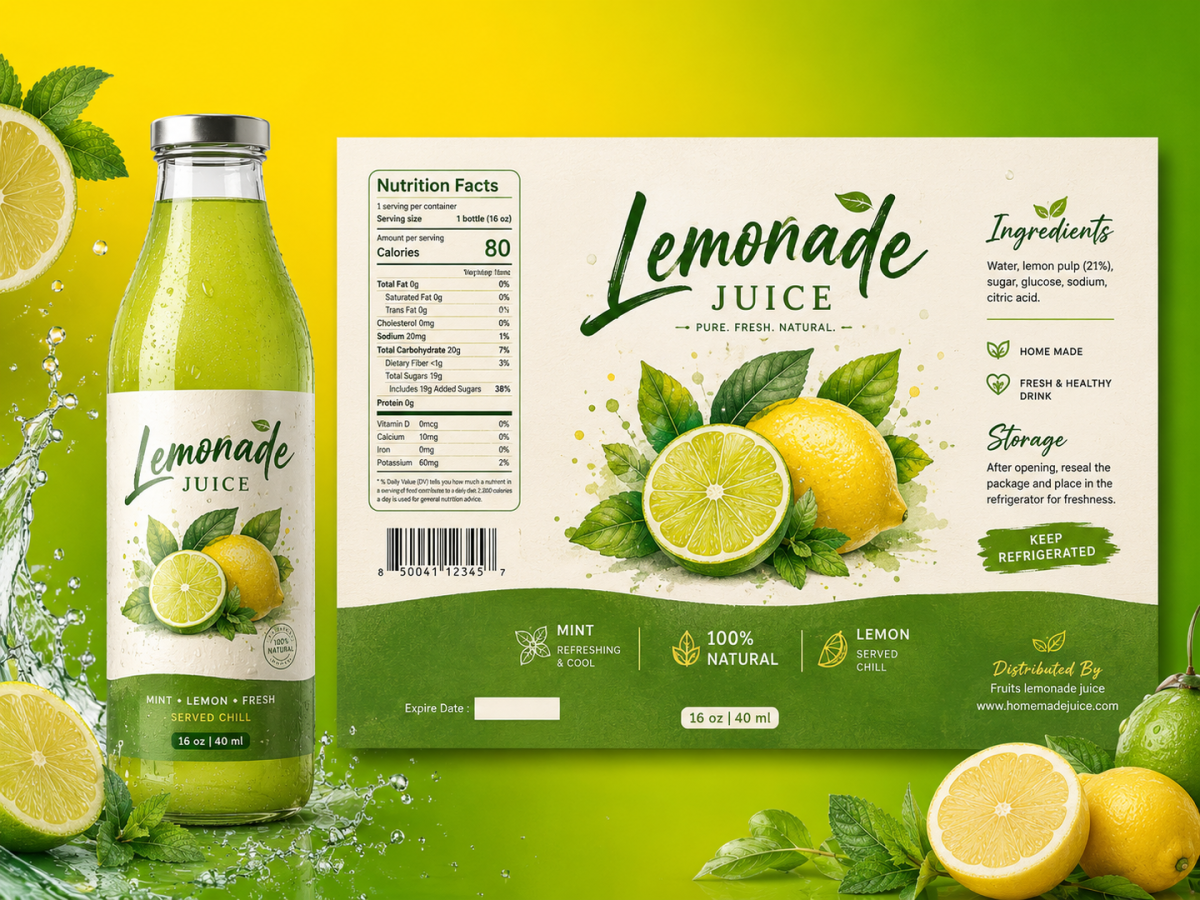
One is AI data labeling — training datasets, annotation tools, the stuff ML engineers use. Not what we're talking about. The other is what this post covers: tools that generate visual product label designs from text descriptions. You describe your product, pick a style, and the AI produces label artwork with text, graphics, and layout.
These tools sit in a specific niche. They're not logo generators. They're not Canva templates. They're not full-blown packaging design suites like Adobe Illustrator. They're purpose-built for one workflow: turn a product description into a label mockup in seconds rather than hours.
The 2026 landscape splits roughly into three tiers. At the free end, you've got Canva's AI generator and Dreamina — great for concepting, PNG-only output. In the middle, dedicated tools like Pixazo and Sami AI offer label-specific features with some export flexibility. At the pro end, Dill (backed by BrewDog and Busaba as customers) cuts food-label creation from roughly an hour to two or three minutes, with FDA-trained AI models, while LabelMakePro introduced an open-source Label Markup Protocol so you can edit every element — text, shapes, 20+ barcode formats — after generation.
The common thread: none of these tools claim you should ship whatever the AI spits out. The smart ones position themselves as step one of a two-step process.
The 10-Second Concept: What Happens When You Remove the Blank Canvas
The traditional label design timeline looks like this: write a brief, find a designer, wait for sketches, review, request revisions, wait again, approve, receive print-ready files. Even a fast turnaround is days. Typical is one to three weeks.
AI doesn't compress that whole pipeline. It obliterates step one.
Describe "minimalist skincare label, sage green and cream, apothecary vibe, recycled-paper texture" and you get back a grid of variations in under a minute. Ten different directions. Change the color palette? Ten more. Swap the typography from serif to sans? Another ten. Google's Pomelli Agent takes this even further — it builds an entire "Business DNA" (fonts, colors, tone of voice) from a brand description and generates labels, brand books, and websites that share a consistent visual identity.
The speed is real. But speed creates a specific trap: more options don't mean better decisions. I've watched someone burn two hours generating 80 label variations and end up more confused than when they started. The tool that gives you 10 concepts in 90 seconds also gives you decision fatigue in about 20 minutes.
The outcome depends entirely on whether you treat the AI output as a starting point or a finish line.
Why AI Still Can't Spell on Your Product Label
Text rendering is the elephant in the room with every AI image generator, and labels make it worse because text is the product.
Diffusion models generate images by starting from noise and iteratively denoising toward a target. They learn visual patterns — shapes, textures, compositions. But text in an image isn't a visual pattern the way a tree or a face is. It's a precise sequence of specific shapes that follow rigid rules. The model doesn't "know" that "INGREDIENTS" must contain exactly those ten letters in that exact order. It sees plausible letter-like shapes that statistically resemble the word, and sometimes it guesses wrong.
Accuracy rates vary dramatically across models. GPT Image 2 hits roughly 99% on short text — impressive until you do the math and realize that on a label with 50 words, a 1% per-word failure rate means you're likely to have a garbled character somewhere on every other label. DALL-E 3 lands around 75%. Midjourney v6 is closer to 45%. These numbers are from controlled tests; real-world performance on long, regulation-heavy labels is worse.
For a hot sauce label with a brand name and a tagline, 99% is fine — you'll spot the error instantly and regenerate. For an FDA-regulated nutrition facts panel where every character matters legally, 99% is nowhere near good enough. That's why Dill explicitly positions its FDA-trained models as the differentiator for food and beverage brands. It's also why the label printing industry itself approaches AI cautiously — FINAT, the international label industry association, is evaluating AI for design automation and defect detection but hasn't signed off on AI-generated text for compliance-critical elements.
The practical takeaway: if your label text matters (and it always does), budget for human text verification. Always.
Free vs Paid: The Gap Is Bigger Than You'd Expect
The free tier of every AI label tool gives you the same thing: a PNG you can look at on your screen. That's fine for internal concepting, investor pitch decks, or showing a designer what direction you have in mind.
The moment you need to print, you hit the paywall. Vector export — SVG, EPS, or PDF at 300+ DPI — is the number one differentiator between free and paid. A PNG rendered at screen resolution will look blurry on a physical label. A vector file scales to any size without quality loss, which is what any print shop requires.
Here's the rough breakdown:
Tier | What you get | Typical cost |
|---|---|---|
Free | PNG exports, limited generations, basic styles | $0 |
Pro | SVG/PDF export, 300+ DPI, commercial license, template library | $15–49/mo |
Enterprise | FDA-trained models, API access, regulatory compliance checks, multi-language support | $69–200+/mo |
The commercial licensing is the other hidden tripwire. Some free tiers retain rights to generated images or restrict commercial use. If you're selling products with those labels, read the terms. Paying for a Pro plan almost always includes a full commercial license.
When is free enough? Internal mockups, pitch decks, mood boards, or communicating a direction to a designer. When do you need to pay? The moment the output goes on a physical product someone buys.
The Workflow That Actually Works (According to People Doing It)
Across Reddit's r/smallbusiness, r/graphic_design, and r/ecommerce, a clear consensus has formed around how AI fits into label design. It's not "AI vs human." It's "AI then human."
Here's the hybrid workflow small brands are actually using:
Step 1 — Generate concepts (AI). Feed the AI your product description, brand vibe, and any reference labels you like. Generate 10 to 20 variations. Don't overthink this stage — you're fishing for directions, not final files.
Step 2 — Pick the winner (you). Narrow to the one or two concepts that feel right. Trust your gut here. You know your brand better than any algorithm.
Step 3 — Hand off for refinement (human). Send the winning concept to a designer or take it into Canva or Kittl yourself. This is where text gets corrected, compliance elements get verified, and the design becomes print-ready.
This three-step flow is what Dill was built for — their templates go from concept to print-ready in minutes because they bake in the regulatory checks that food brands can't skip. one.five, a startup that just raised €14 million for AI packaging R&D, is betting their entire product on this hybrid model: an AI copilot that matches materials to requirements but keeps the human in the loop for final decisions.
The pattern is consistent. AI generates options. Humans curate and finish. Anyone promising full automation from prompt to print is selling something that doesn't exist yet — and might not for a while.
There's one more edge worth noting: consumer perception. The Graza packaging controversy — where Reddit tore apart a mayo brand's redesign and called it "Canva-slop" — shows that consumers can and do penalize brands they perceive as using AI-generated packaging. A Newsweek piece covering a designer with 24 years of experience who said AI "ruined" their career racked up 207,000 upvotes. The stigma is real and it's not going away overnight. The fix isn't to hide AI involvement — it's to use it as a prototyping tool and let the human refinement step produce something that doesn't read as AI-generated.
Which AI Label Creator for Your Use Case
The right tool depends entirely on what you're labeling and where it's going:
Use case | Best fit | Why |
|---|---|---|
Food & beverage | FDA-trained models, ingredient-list aware, cuts 1hr to 2–3 min | |
E-commerce badges & stickers | Sami AI | Built for digital-first product badges, promotion labels |
Full brand identity + labels | Zawa AI or Google Pomelli | Brand memory across all designs, consistent identity, SVG export |
Print-ready professional | Packify.ai or Kittl | Industry-standard print specs, color profile support |
Physical thermal labels | Nelko | Hardware-aware, exact sizing for thermal printers |
Quick concepts (free) | Canva AI or Dreamina | Zero cost, fast iteration, good enough for internal use |
If you're exporting physical products that consumers will hold in their hands, start with Dill or Packify.ai and budget for a designer to do the final polish. If you're shipping digital badges or doing rapid internal concepting, the free tier of anything will do the job.
AI label creators are getting better fast. But the workflow that works hasn't changed: AI for speed, humans for precision. The best label in 2026 is the one where you can't tell which parts came from a prompt and which came from a person.