How to Route AI Requests to the Cheapest Model

Introduction
Most AI applications still send every request to the same frontier model. It is easy to understand, easy to debug, and often wildly more expensive than necessary. A support FAQ, a JSON extraction step, and a difficult multi-document decision do not need the same amount of intelligence.
The practical goal is not to send every request to the model with the lowest token price. It is to route each request to the cheapest approved model that can reliably produce an accepted result. That small change in definition protects quality while making the savings measurable.
In this guide, we’ll build that idea into a production-friendly pattern: a capability matrix, deterministic rules, optional classification, validation, escalation, and a break-even calculation that includes retries and routing overhead.
Start with the cost-per-accepted-result equation, not the cheapest token price
The phrase “cheapest model” hides several costs. A low-price model that produces invalid JSON, breaks a tool call, or needs two retries may cost more than a stronger model that succeeds once.
Use this rough equation for each task type:
# Estimate the real cost of a routed task
total_cost = route_cost + model_cost + retry_cost + escalation_cost + review_cost
accepted_result_rate = accepted_results / total_requests
cost_per_accepted_result = total_cost / accepted_results
The accepted result is whatever your application actually needs: valid JSON matching a schema, a correct classification, a resolved support ticket, or a safe tool action. The metric connects model selection to business value instead of treating token price as the whole story.
For example, suppose a small model costs $0.002 per request and passes validation 92% of the time. A stronger model costs $0.01 and passes 99% of the time. If failed small-model responses are retried with the stronger model, the “cheap” route may have a surprisingly narrow advantage. If the output is customer-facing or high-risk, the stronger model may be the cheaper choice after review and recovery costs.
This is also why Vercel’s cost-aware routing guide recommends combining routing with budgets, retries, and observability. The next step is to make those calculations specific to your workload.
Build a small model capability matrix from your real prompts
Do not begin by choosing a router. Begin by collecting a representative sample of your own requests. Group them by task rather than by vague labels such as “easy” and “hard.” Useful groups include:
Classification and tagging
Extraction into a strict schema
Summarization
Retrieval-grounded answers
Coding or debugging
Long-context synthesis
Planning and tool use
High-risk decisions requiring human review
For each task, record the minimum acceptable bar. A capability matrix might look like this:
Task | Quality bar | Latency target | Approved candidates | Escalation signal |
|---|---|---|---|---|
FAQ classification | Correct label and valid JSON | 500 ms | Small model, medium model | Schema or confidence failure |
Invoice extraction | All required fields, no invented values | 2 s | Medium model, frontier model | Missing field or low validation score |
Support reply | Helpful, grounded, brand-safe | 3 s | Small model, medium model | Unsupported claim or safety flag |
Multi-document decision | Evidence-backed recommendation | 10 s | Frontier model | Conflicting evidence or high risk |
Benchmark candidates on the same prompt set. Measure task accuracy, structured-output validity, latency, input/output tokens, and provider availability. A general leaderboard can suggest which models to test, but it cannot tell you whether a cheap model handles your schema, language mix, domain terminology, or tool definitions.
Keep the pool small. Three or four approved candidates are easier to evaluate and govern than a catalog of hundreds. Pricing and model rankings change, but the capability matrix and acceptance tests are durable assets.
Use deterministic rules first, then classify only ambiguous requests
The most reliable router is often less clever than expected. If the application already knows the operation being performed, use that information directly. A document pipeline can route extraction, deduplication, and formatting without asking another model to classify the prompt.
# Route known workflow stages without an extra inference call
ROUTES = {
    "extract": "cheap-structured-model",
    "summarize": "fast-summary-model",
    "plan": "frontier-reasoning-model",
    "tool_call": "validated-tool-model",
}

def choose_model(task_type: str) -> str:
    return ROUTES.get(task_type, "medium-general-model")
Use a lightweight classifier only when the request is genuinely ambiguous. A practical sequence is:
Apply a fast rule or known workflow route.
Check privacy, region, risk, and tool-compatibility constraints.
If multiple candidates remain, classify complexity or task type.
Choose the lowest-cost candidate that meets the task’s measured bar.
Validate the result and escalate when necessary.
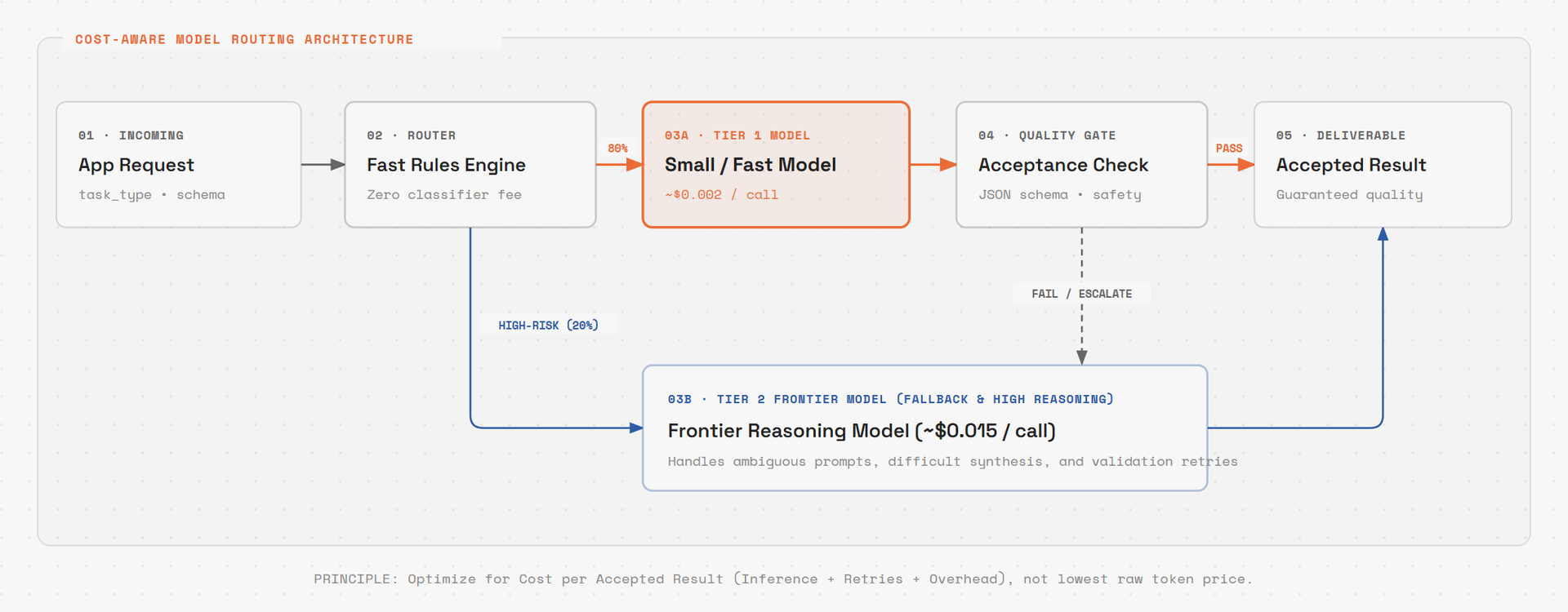
This avoids paying a routing fee on every predictable request. It also makes decisions explainable: “invoice extraction went to the medium model because the task requires schema compliance and the document exceeded the small model’s tested context range” is more useful than “the AI router chose it.”
For API-based routing, an OpenAI-compatible gateway can keep the application code stable while the policy changes behind one endpoint. OpenRouter’s routing documentation is a useful reminder that an automatic mode may optimize quality and reliability rather than absolute lowest price. If price is your objective, express that explicitly in the policy.
Add quality gates, structured-output checks, and risk-based escalation
Cheap routing only works when the system can recognize a bad result. Every route should have a success check appropriate to its task.
For structured output, validate against a schema. For retrieval-grounded answers, check citations or required source identifiers. For tool use, validate the function name, argument types, permissions, and whether the action is reversible. For customer-facing text, run policy and factuality checks before delivery.
# Escalate when a cheap response does not clear its acceptance bar
def should_escalate(result, task):
    if not result.schema_valid:
        return True
    if result.tool_call and not result.tool_call_is_safe:
        return True
    if result.groundedness_score < task.min_groundedness:
        return True
    if task.high_risk and result.confidence < task.min_confidence:
        return True
    return False
Treat side effects differently from read-only work. A cheap model may be perfectly adequate for summarizing a log but inappropriate for deleting data, changing a customer’s account, or publishing content. For agents, route by action type and effect risk—not only by how difficult the prompt sounds.
Fallbacks should be explicit. Define a primary model, one or two compatible fallbacks, and a maximum retry budget. Otherwise, a provider outage can turn a cost-saving route into an uncontrolled cascade of retries.
This validation layer is the boundary between a demo and a production system. Once the gates are in place, you can safely test cheaper candidates with a percentage of traffic.
Measure break-even: routing overhead, retries, cache effects, and reliability
The router itself has a cost. It may add classifier tokens, gateway fees, latency, cache misses, logging, and operational maintenance. Calculate the break-even point before deploying it broadly.
# Monthly break-even estimate
savings_per_request = baseline_cost - routed_cost
net_savings_per_request = savings_per_request - router_cost_per_request
break_even_requests = fixed_router_cost / net_savings_per_request
Use routed cost, not just the selected model’s list price. Include:
Input and output tokens, including cached and uncached input
Router or gateway fees
Failed validation and retry rates
Escalations to stronger models
Provider failure and fallback rates
Latency penalties for user-facing workflows
Human review or correction costs
A router can be economically pointless for a low-volume app with a tiny price spread. It can be transformative for a high-volume workflow where most requests are routine. Community discussions on Hacker News’ Frugon thread and the CostRouter thread repeatedly return to this question: what is the cost to converge on an accepted answer, not merely the cost of the first generation?
Log every decision with a request ID. At minimum, store the task type, eligible models, selected model and provider, routing reason, token counts, latency, validation result, retries, escalation path, and final acceptance outcome. Review the data by task type every week. If a route’s pass rate falls, pin it to a safer model until the evaluation set is refreshed.
A practical OpenAI-compatible gateway pattern for 2026
You can implement the first version without training a sophisticated router. Put a gateway in front of your providers, maintain a small configuration file, and make the application send a task label or policy hint with each request.
# Send a request through one gateway while keeping routing policy centralized
from openai import OpenAI

client = OpenAI(
    api_key="gateway-key",
    base_url="https://your-gateway.example/v1",
)

response = client.chat.completions.create(
    model="route:customer-support",
    messages=[
        {"role": "system", "content": "Answer only from the supplied support policy."},
        {"role": "user", "content": question},
    ],
    metadata={"task_type": "faq", "risk": "low"},
)
The gateway should resolve the route, enforce the approved pool, apply provider restrictions, record the decision, and return an OpenAI-compatible response. Start with configuration-led routing:
faq→ cheapest model that passes your FAQ evalsextract→ model with the highest schema-validity rate under the cost limittool_call→ model/provider combination tested with your function definitionshigh_risk→ stronger model plus review or a human approval gate
Then add adaptive routing only where the logs show a real opportunity. A classifier can learn from accepted and rejected results, but it should not silently replace your safety policy. The LiteLLM AI Gateway updates show the direction of mature routing systems: explainable decisions, cost dashboards, prompt-cache visibility, and governance alongside model selection.
The right rollout is gradual: shadow-route requests first, compare candidate outputs, canary a small percentage, and keep a kill switch that returns traffic to the known-safe model. Re-run the evaluation set whenever a provider changes price, model version, context behavior, or tool-calling support.
The simplest durable rule is this: do not ask which model is best in the abstract. Ask which approved model is good enough for this task, this risk level, and this acceptance test—and then choose the least expensive one that reliably clears the bar. That approach captures the savings of model routing without turning your production system into a black box.